

It is 11:30 PM. Your eyes are bloodshot, your coffee has gone cold, and you are staring blankly at a single, blindingly white PowerPoint slide. You have all the data, the strategy is solid, but the thought of spending the next three hours wrestling with text boxes, aligning bullet points, and picking a color palette makes you want to close your laptop and run away.
We have all been there. Presentation design is notoriously painful. It forces business minds, educators, and creators to act like professional graphic designers, often with frustratingly slow results.
But things have changed completely. You no longer need to build slides brick by brick. By using smart, free AI tools for making presentations instantly, you can transform a simple text prompt or a messy outline into a client-ready, beautiful slide deck in under two minutes.
Let’s dive into the absolute best free tools available right now that will completely alter how you work.
The Presentation Panic Is Real (But AI Just Fixed It)
Think about the last deck you built. How much of your time was spent actually refining your ideas, and how much was wasted on making sure a logo didn’t overlap with a paragraph? Traditional tools treat presentation design as a manual drafting task.
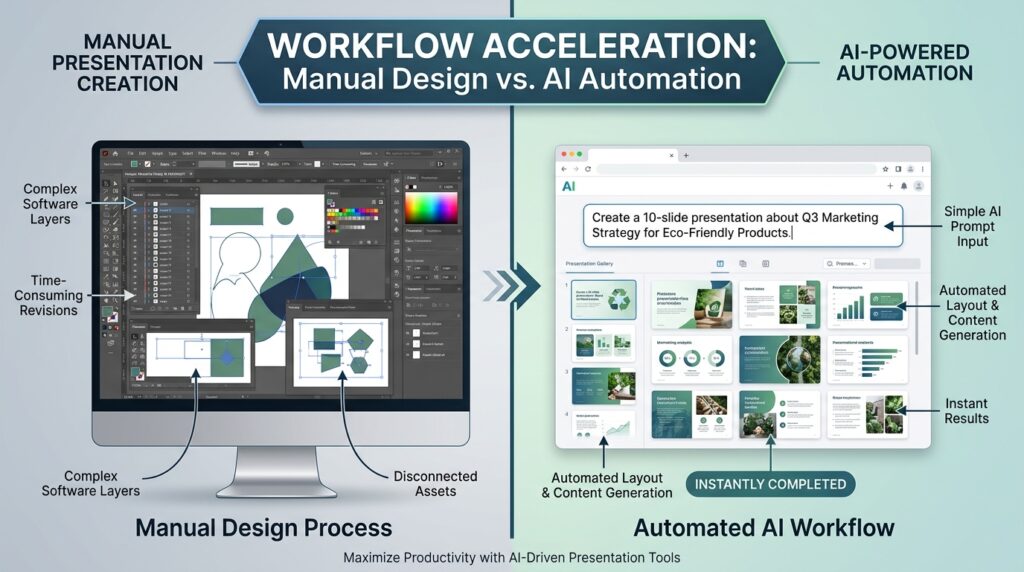
Artificial intelligence flips this workflow on its head. Instead of staring at an empty canvas, you start at the finish line. AI presentation tools act as an intuitive design partner. They interpret your core topic, generate a structured narrative framework, choose matching visual layouts, and handle the typography out of the box.
This means your role shifts from an exhausted production worker to an efficient creative editor. You review, tweak, and personalize the content, saving up to 80% of your production time.
What Makes a Great Free AI Presentation Tool?
Not all AI slide makers are created equal. Some simply slap bullet points onto ugly, generic backgrounds, while others deliver highly customized, dynamic layouts. When testing these platforms, we looked at four main pillars:
Speed of Generation: Can it build a coherent slide deck in seconds?
Design Intelligence: Do the slides look custom-designed, or do they look like cheap 90s templates?
Customization Flexibility: Can you easily change layouts, colors, and fonts without breaking the design?
True Free Tier Value: Does the free version offer real utility, or is it locked behind a paywall immediately?

The Best Free AI Tools for Making Presentations Instantly
Here is a curated breakdown of the top platforms that deliver stunning, automated slides without costing you a single dime.
Gamma App: Best Overall for Beautiful Document-to-Slide Conversion
Gamma App feels completely magical the first time you use it. Instead of forcing you into rigid slide dimensions right from the start, Gamma generates a fluid, responsive document that can be presented as beautifully formatted slides with a single click.
You simply type in a brief prompt or paste a messy brain-dump document. Gamma will instantly output a structured outline. Once you approve the outline, you choose a visual theme, and the AI generates the entire presentation deck. The layouts are modern, cards nest beautifully, and it avoids looking like standard, boring presentation software.
Tome: Best for Interactive, Multimedia Storytelling
If you need a presentation that feels like a living, breathing digital experience rather than a flat PDF, Tome is your tool. It uses conversational AI to construct highly compelling narratives.
Tome is incredibly skilled at contextual alignment. If you tell it to build a pitch deck for a futuristic sustainable energy startup, it won’t just build text; it will integrate AI-generated imagery, clean charts, and interactive web embeds that perfectly match that aesthetic. The free tier gives you a generous pool of creation tokens to get moving immediately.
Beautiful.ai: Best for Smart, Self-Adjusting Layouts
While Beautiful.ai focuses heavily on its premium features, its trial and basic tiers introduce something essential: a design engine with built-in guardrails.
Have you ever added an extra sentence to a slide, only for the text box to spill over the edge and break the entire layout? Beautiful.ai fixes this forever. As you add content, change icons, or add bullet points, the slide dynamically resizes and rearranges itself in real-time based on professional design principles. It is easily one of the most efficient free AI tools for making presentations instantly without layout headache.
Simplified: Best for All-In-One Content Creation & Video Editing
Simplified is an expansive creative suite designed for modern marketers. Alongside social media scheduling and Video Editing modules, its AI presentation maker is fast and highly efficient.
It generates highly tailored branded decks by pulling your specific brand kit elements (logos, hex colors, custom fonts) automatically. This makes it an incredibly valuable option for freelancers and independent agencies who need to churn out consistent pitches without starting over every single time.
SlidesGPT: Best for Pure Speed and Simple Conversational Prompts
If you do not want to create an account, fiddle with settings, or browse endless menus, SlidesGPT is exactly what you need. It uses an incredibly straightforward interface based purely on ChatGPT API architecture.
You type your prompt directly into a search bar on the homepage, and the machine builds out the full deck right in front of your eyes. It is fast, highly responsive, and provides downloadable files compatible with PowerPoint and Google Slides seamlessly.
Canva Magic Design: Best for Familiar Workflows and Massive Asset Libraries
Almost everyone has used Canva at some point. Their ecosystem now features Magic Design, an AI presentation tool powered by your basic text prompts.
The true advantage of Canva’s AI tool is the access it provides to their colossal library of icons, premium stock imagery, animations, and vector graphics. The AI sets up the skeleton, structure, and theme of your slides, leaving you free to finish formatting using tools you already know inside and out.
Plus AI (Google Slides Extension): Best for Users Who Refuse to Leave Google Drive
If your entire company or school workflow runs entirely on Google Docs and Google Slides, learning an entirely new app platform might feel like too much friction. Plus AI operates as a smart plugin directly inside Google Slides.
It handles the heavy lifting of researching, designing outlines, and laying out the initial slide structures. This allows you to leverage AI speed without losing the collaborative cloud features native to the Google Workspace ecosystem.
| AI Tool Name | Core Pros & Strengths | Key Cons & Limitations | Free Plan Limitations |
| 1. Gamma App Best Overall | • Fluid, responsive layouts that break traditional boundaries. • Flawless document-to-presentation text parsing. • Stunning, modern editorial templates built natively. | • Decks look like interactive web documents rather than standard PPT grids. • Advanced media block integration requires a brief learning curve. | 400 credits upon registration (approx. 10 decks). “Made with Gamma” watermarks included on exports. |
| 2. Tome Best for Multimedia | • Highly conversational, deep narrative prompt interpreter. • Seamless interactive digital elements & web embeds. • Sleek, minimalist dark mode aesthetics by default. | • Exporting to classic offline files (.pptx) is restricted on lower tiers.• Built heavily for web-viewers rather than traditional presentation projectors. | Free initial registration token pool allocation for personal workspaces; premium assets are locked. |
| 3. Beautiful.ai Best Auto-Layout | • Smart design engine auto-shifts elements gracefully. • Guarantees polished margins & typographic consistency. • Excellent professional charts and data widgets. | • Free trial mechanics are heavily constrained over time. • Rigid layout guardrails prevent custom manual design layout alterations. | Limited-time basic tier trial access to primary structural design decks; teamwork features paid. |
| 4. Simplified Best Marketers Suite | • All-in-one graphic design and content writing bundle. • Applies brand kits (logos, custom fonts) instantly. • Integrated video editing and asset management tools. | • The comprehensive dashboard can feel complex and cluttered. • Initial AI output templates can look repetitive. | Free access to basic text-to-presentation workflows with fixed monthly generation limits. |
| 5. SlidesGPT Best for Speed | • Zero signup, login, or registration required. • Blazing fast text-to-slide structural rendering. • Clean interface based cleanly on direct API inputs. | • Slides are heavily text-dominant and lack stylized vector assets. • Very basic color palettes compared to dedicated design platforms. | Free to generate, view, and share web links. Downloading native PowerPoint/Google Slides files requires a fee. |
| 6. Canva Magic Design Best Asset Library | • Immediate access to millions of vectors, icons, and photos. • Extremely familiar editor environment for creators. • Great pre-made animated transition options. | • Requires significant manual content tweaking to look organic. • AI generation step covers structural baselines only. | Free access to Magic Design elements with a free standard account; premium templates require Pro tier. |
| 7. Plus AI Best Workspace Native | • Operates inside your existing Google Slides platform. • Perfect for collaborative workspace environments. • Excellent for updating old presentations slide-by-slide. | • Entirely locked to the Google Drive storage ecosystem. • Visual designs lean conservative rather than cutting-edge. | Free introductory trial quota for generating custom presentation templates directly within Google Slides. |
How to Prompt AI for the Perfect Pitch Deck
To get great results out of these tools, you need to write great prompts. If you give a tool a generic prompt, you will get a generic presentation.
Bad Prompt: “Make a presentation about digital marketing.”
Great Prompt: “Create an 8-slide startup pitch deck for a B2B SaaS digital marketing agency targeting local retail businesses. Use an authoritative, modern tone, focus heavily on ROI metrics, and ensure a clean, minimalist design layout.”
By giving the AI a clear role, a specific target audience, a defined tone, and structural constraints, the generated deck will look custom-made for your specific project.
3 Crucial Mistakes to Avoid When Using AI Slide Creators
While these platforms save massive amounts of time, relying on them blindly can cause problems. Keep these three points in mind:
- The Over-Automated Look: Never use an AI presentation exactly as it was generated. Spend ten minutes swapping out default stock icons, tweaking headshots, and injecting your personal voice to make sure it doesn’t feel clinical.
- Hallucinated Facts and Figures: Generative AI models are designed to structure languages beautifully, but they can occasionally make up statistics. Always double-check metrics, market research data, and direct quotes before sharing a deck with an audience.
- Losing Your Brand Voice: Use custom brand kit colors whenever possible. If your presentation uses the exact same color scheme as thousands of other users, your brand identity will get lost in the noise.
Frequently Asked Questions
What are the best free AI tools for making presentations instantly?
The top free AI tools for making presentations instantly include Gamma App for document conversions, Tome for visual storytelling, and Canva Magic Design for access to a massive library of creative design assets.
Can I export AI-generated presentations directly into Microsoft PowerPoint?
Yes, the majority of modern platforms like Gamma App, SlidesGPT, and Beautiful.ai provide native .pptx exports, allowing you to fine-tune your presentations inside traditional desktop software.
Do these free AI tools require graphic design skills?
Not at all. These tools are built specifically to eliminate manual design formatting entirely. The platform handles layout logic, font pairing, and color harmony automatically based on your initial prompt.
Is my input data safe with web-based AI presentation tools?
While most reputable platforms secure your account, you should avoid pasting highly sensitive company financial data, unannounced proprietary code, or private personal details into any public generative AI tool.
Conclusion: Work Smarter, Not Harder
The era of spending entire weekends fixing slide borders and adjusting bullet alignments is officially over. By leveraging free AI tools for making presentations instantly, you free up your mental energy to focus on what actually matters: your story, your strategy, and your presentation delivery.
Pick one of the tools listed above—Gamma App or Canva Magic Design are great places to start—plug in your next big idea, and watch hours of manual design work disappear into thin air.
What are you building next? Drop a comment below or share this guide with a teammate who is still formatting their slides by hand!
Top 5 AI Free Video Editing Tools That Make Editing Easier